Windows 10 tips- install or setup tips, user tips, new feature of windows 10,
Keyboard shortcuts and basically what is changed in windows 10
Hardware required to install windows 10
Windows 10 install Minimum required hardware for laptop and desktop
- 1 GHz processor,
- 1 GB of RAM (3-bit) or GB RAM (64-bit), 1
- 6 GB of disk space (3-bit) or 0 GB space (64-bit)

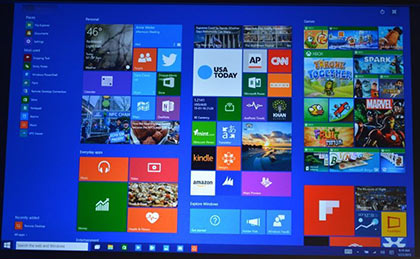
New features of windows 10
Main features of windows 10 and what is changed in windows 10
- If you want use one operating system (win10) like your desktop computer, laptop, tablet, smartphone and other smart device, at a time all smart device supported.
- Windows 10 does not have any in the start page or CTA
- In you want back Windows 7-style Start button you can do it easily
- Touch Mode to Windows 10 work very smoothly
- Windows 8-style tiles on the Start menu will be available and the tiles will have to live side by side. You can resize the tiles of his choice.
- For search: Windows Start menu or search the web from the browser directly without having to search the internet facility is available in Windows 10.
- Default icons have been changed. [How to increase 20% in the speed of the Internet & Computer System]
Free windows 10 install and undate
Tow way install for windows operating system:
1st one: Direct update your genuine registered existing windows7 or windows8.
2nd One: After manually download iOS files and install with ‘key’
Note that: in you want it’s free windows 10 your computer will called the ‘non-genuine’. The computer after you install Microsoft 10 “non-genuine” would be marked. However, the user should not be a problem.
Among whom there is genuine or genuine Windows 7 or Windows 8, they did not install Windows 10? According to Microsoft, the Windows 10 to Windows Update or they can get. In this case, however, there is a condition.
20+Basic computer tips for Beginners
windows 10 keyboard shortcuts
Windows Key + Ctrl + D – Create a new virtual desktop and switch to it
Windows Key+Ctrl+D — create a new virtual desktop.
Windows Key+Ctrl+Left — scroll through your desktops to the left.
Windows Key+Ctrl+Right — scroll through your desktops to the right.
Windows Key+Ctrl+F4 — close the current desktop.
Windows Key + Ctrl + F4 – Close the current virtual desktop.
Windows Key + Ctrl + Left / Right – Switch to the virtual desktop on the left or rig
Windows Key + Left –Snap current window to the left side of the screen.
Windows Key + Right – Snap current window the right side of the screen.
Windows Key + Up – Snap current window to the top of the screen.
Windows Key + Down – Snap current window to the bottom of the screen.
Ctrl + Up / Down – As scroll bar – Moves one line up or down in the Command Prompt’s history —
Ctrl + Page Up / Page Down – Moves one page up or down in the Command Prompt’s history
Windows Key+Q — open up Cortana ready for voice input.
Windows Key+S — open up Cortana ready for typed input.
Windows Key+I — open up the Windows 10 settings pane. For more windows 10 keyboard shortcut
Be careful before install windows 10:
- Get backup you C drive Dada- install time should be need to format your C drive.
- If you use laptop need extra battery time for win10
For more details please visit and download windows 10 form Microsoft