Start Strong: Essential Computer Tips for Beginners
Begin your computer journey with these fundamental tips. Familiarize yourself with basic hardware components, practice mouse and keyboard skills, and learn common keyboard shortcuts. Explore the operating system, install essential software, and regularly update your system. Back up important files, practice safe browsing habits, and invest time in learning basic troubleshooting techniques. Embrace online tutorials and resources to build confidence and proficiency in your computer skills from the start.


Learn Keyboard Shortcuts:
Familiarize yourself with basic keyboard shortcuts like copy (Ctrl+C), paste (Ctrl+V), and undo (Ctrl+Z). These shortcuts enhance your efficiency when using various applications.
- Familiarize yourself with basic keyboard shortcuts like copy (Ctrl+C), paste (Ctrl+V), and undo (Ctrl+Z).
- These shortcuts enhance your efficiency when using various applications.
- Explore additional shortcuts for specific programs you frequently use.
Backup Your Data:
Regularly back up your important files and documents. Use external hard drives or cloud storage services to prevent data loss in case of computer issues.
- Regularly back up your important files and documents.
- Use external hard drives or cloud storage services to prevent data loss in case of computer issues.
- Set up automatic backups for convenience.
Update Your Software:
Keep your operating system and software applications up to date. Regular updates enhance security, fix bugs, and introduce new features.
- Keep your operating system and software applications up to date.
- Regular updates enhance security, fix bugs, and introduce new features.
- Enable automatic updates when possible.
Use Antivirus Software:
Install reputable antivirus software to protect your computer from malware and viruses. Regularly scan your system to ensure its security.
- Install reputable antivirus software to protect your computer from malware and viruses.
- Regularly scan your system to ensure its security.
- Avoid clicking on suspicious links or downloading files from unknown sources.
Organize Your Files:
Create a systematic file organization structure. Use folders and subfolders to categorize documents, photos, and other files for easy retrieval.
- Create a systematic file organization structure.
- Use folders and subfolders to categorize documents, photos, and other files for easy retrieval.
- Establish a naming convention for consistency.
Learn Basic Troubleshooting:
Familiarize yourself with basic troubleshooting techniques. Know how to restart your computer, resolve software glitches, and seek help when needed.
- Familiarize yourself with basic troubleshooting techniques.
- Know how to restart your computer, resolve software glitches, and seek help when needed.
- Explore online forums and tutorials for additional troubleshooting tips.
Practice Cybersecurity:
Be mindful of online security. Use strong, unique passwords for your accounts, and be cautious about sharing personal information online.
- Be mindful of online security.
- Use strong, unique passwords for your accounts, and be cautious about sharing personal information online.
- Enable two-factor authentication for added security.
Explore Online Resources:
Take advantage of online tutorials and resources to enhance your computer skills. Platforms like YouTube and educational websites offer valuable lessons.
- Take advantage of online tutorials and resources to enhance your computer skills.
- Platforms like YouTube and educational websites offer valuable lessons for beginners.
- Explore courses on basic computer literacy and software applications.
Basic Computer tips: Units O f Computer Memory
Kilobyte (KB) 1 KB = 1024 Bytes
Megabyte (MB) 1 MB = 1024 KB
GigaByte (GB) 1 GB = 1024 MB
TeraByte (TB) 1 TB = 1024 GB
PetaByte (PB) 1 PB = 1024 TB
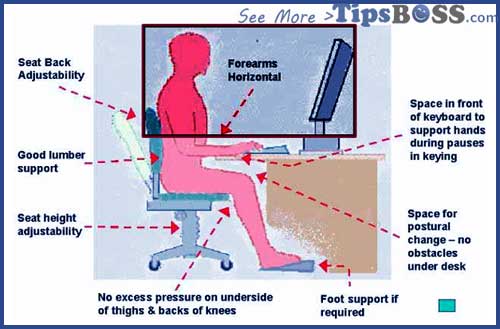
Computer Tips #1 :
Seating arrangement in front of computer:

Computer Tips #2 :
Why computer Crashes/Hang problem & solution:
- Check your cooling fan to working properly.
- Check your RAM and fixed accordantly.
- Check motherboard all connection
- Care your power-supply stations work properly.
- Check your mother board battery.
- Use authorized “Anti-virus” and scan daily or weekly.
- Check any windows file is miss or not. Check windows system file by “SFC” for sfc go run option type “sfc” system file check .
Computer Tips #3 :
How to improve computer typing speed:


typing speed test/software & more:
Computer Tips #4 :
How to speed up computer/Laptop:
- Monthly Disk Defragmentation
- Protection a strange antivirus
- Keep always Empty the Recycle Bin
- Delete Your unused data, image, file and Holder
- Keep 30% Free space Heard Desk
- Clean Your Computer’s Windows Registry
- Uninstall and Remove Unneeded Programs
- Go “RUN” option and type “tree” and > ENTER
- Go “RUN” option and type “%TEMP%” and > ENTER
- Maintenance e-Safety rules when use internet.
Computer Tips #5 :
Motherboard information Basic-tips:

How to increase 20% in the speed of the Internet & Computer System.
Computer Tips #6:
PenDive Shortcut virus Problem:
Tips # 01 PenDive Shortcut virus:
Special Search system file and Holder by “.” (dot) on emergency. Virus status is not clean this system. But, you will can easily catch file important files.


How to find out your file from pen drive in
1st step >Open your pen drive
> if see all file and holder under affected Shortcut virus than (open to fail your file)
> go the search option (press F3) type “.” dot
> see here all file and holder
> see and select file or files(if you want multiple files press “Ctrl+ Select file )
> “past” file your local computer disk > Than open >and Enjoy.
See more about computer-safety-tips-rules and internet safety.
Computer Tips E-safety tips
Tips # 02 PenDive Shortcut virus:
Recover File and format the affected pen drive or any external drive:
Step or Tips 1st > Connected or plug your pen drive to your PC, then download and install a data recovery software. Run the app for a free scan of your drive to see if there are some files can be found and then recovered.
Computer Tips #7 :
RAM ? ddr3 dDr2:

Computer Tips #8 :
How to get the lost data from memory card hard disk repair:
Download Data Recovery Software
Step or Tips 2nd > After complete re-format the drive on your PC (use quick format option). This should wipe everything including the virus and your drive will be like new, the folders shortcuts problem will gone forever too. But the data are not erased permanently even if you format the drive.
Step or Tips 3dr > Re-use the data recovery tool to re-scan your drive to see if more data can be found. Do not worry, it only recovers general files such as documents, folders, photos, videos, music etc and won’t touch the virus.
Be careful: Note: the recovery program performs read-only operation and won’t do any damage to your disk.
Computer Tips #9 :
Basic Computer Layout Input-output:


Computer Tips #10 :
How save your computer Security System
- Take care don’t spam in your email ID.
- Avoid Accept Offers of “Virus Scans” “Free PC Scans” “clean your system” also careful That Pop up When you are using Internet in your browsing for internet security.
- Avoid plug-in when USB drives or any external drive that you find lying around. Criminals can use them to steal your data or others file and folder.
- Turn off your auto run option USB flash drive’s and any external drive
- Avoid Let Spammers See Your “Out of Office” or any pending message Replies, see more about e-safety rules.
- When read email don’t click the “unsubscribe” “remove link” or ”chick to spam” link at the CTA of unsolicited emails
- Don’t use or install unauthorized of software or don’t chick any .exe extinction.
- Protecting a computer virus safe computing behavior, maintenance some tips when use public computer.
- Always try to impotent file backup.
- Careful about your password, Don’t tell anybody your password, Choose a password that’s hard to crack
- Review your credit reports routinely or daily, when login your any credit account, don’t forget to logout.
- Here important tips that we should all keep in mind in order to protect our own system. There are a lot of hackers lurking around the web waiting to strike anytime so better be ready and capable of handling such scenario.
- Any email or notice or computer message, If you don’t understand say no and consult IT support. It’s easier to go back and say yes if you need to than be sorry and have to rebuild your machine. Or don’t chicks any message miss understanding.
- Award or Certificates online, If you don’t understand a website certificate message, say no and consult IT support. It is easier to go back and say yes if you need to than be sorry and have to rebuild your credit.
- Protection your PC use antivirus: Use an authorized antivirus or update timely. Does not slow your computer down nearly as much as a virus does.
Computer Tips #11 :
Computer error Message and solve:
Windows run-time errors
Here below and flow the comments:
> 1st fo all Boot to a DOS prompt option.
> Type the MS-DOS : “cd\” and press Enter
> “REN” autoexec.bat autoexec.chand press Enter
> “REN” config.sys config.ch and press Enter
> For laptop check regularly battery and how to protect laptop battery for long time.
This is completed, next restart your computer.
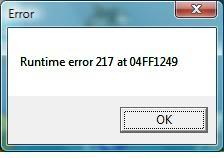
See sample Mesage. Hopfully remove your problem.
More Details Read Chick Here by windows.microsoft.com.
Computer Tips #12 :
Hardware troubleshooting tips:
> How to solve your computer by Crashing
Here below the commants
> 1st fo all Boot to a DOS prompt option.
> Type the MS-DOS : “cd\” and press Enter
> “ren” autoexec.bat autoexec.chand press Enter
> “ren”config.sys config.ch and press Enter
This is completed, next restart your computer.
Basic computer tips for Beginners
Tag Word: Computer tips, computer tips and tricks, computer maintenance tips, computer repair tips, computer security tips computer networking tip, free computer tips, computer tricks and tips, computer safety tips, computer useful computer tips,
Computer tips & tricks speed up my computer online computer repair, fix my computer, online tech support, remote computer repair, computer fixrepair computer, computer repair technician, computer tips and tricks pdf,computer hardware tipsand tricks,
Online technical support,computer problems, computer support services,slow computer, online computer support,computer repair computer help,,speed up my computer free, computer networking tips and tricks,computer cooling tips,computer technical support,computer repair service,