









Loading tools... Please wait.
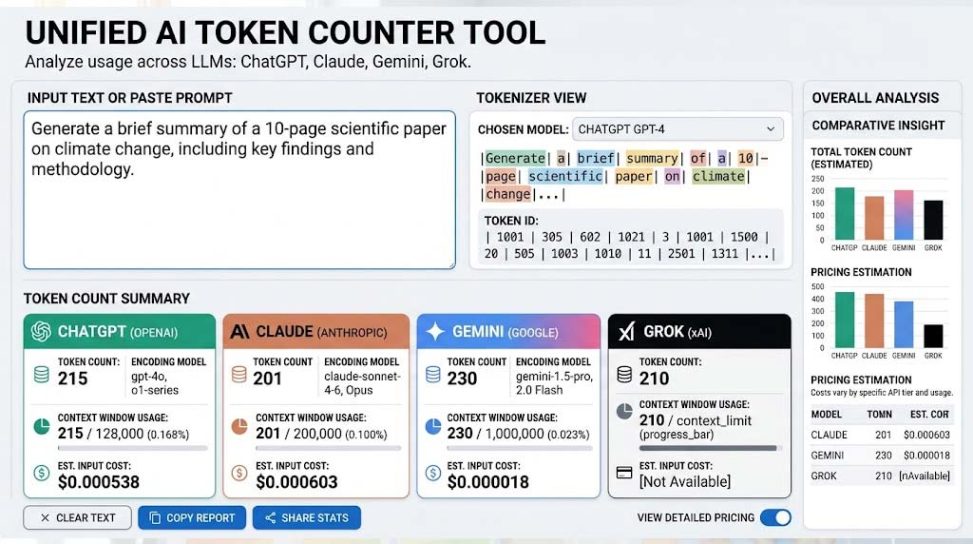
AI tools such as ChatGPT, Claude, Gemini, and Grok process text using tokens rather than simply counting words or characters. Understanding how many tokens your prompt contains can help you write better prompts, manage context limits, estimate API usage, and prepare large text for AI models. A Token Counter Tool for ChatGPT, Claude, Gemini, and Grok makes this process much easier by giving you a quick estimate of the amount of text you are sending to an AI system.
What Is a Token Counter?
A token counter is a tool that estimates how text is divided into tokens by an artificial intelligence language model. A token may represent a complete word, part of a word, punctuation, a number, or a combination of characters. Because different AI models can use different tokenization methods, the same sentence may not produce exactly the same token count across ChatGPT, Claude, Gemini, and Grok.
This is why token counting is different from ordinary word counting. A paragraph containing 100 words does not necessarily contain 100 tokens. Short words, long words, punctuation, spaces, numbers, and non-English text can all affect the final token count.
Why Token Counting Matters for AI Users
- Prompt Planning: Understand how large your prompts are before submitting them to an AI model.
- Context Management: Keep conversations and documents within the model’s available context window.
- API Cost Awareness: Estimate how much text may be processed when using paid AI APIs.
- Large Document Processing: Break lengthy documents into manageable sections.
- Prompt Optimization: Remove unnecessary text and make prompts more efficient.
- AI Workflow Design: Plan applications that send large amounts of text to language models.
Token vs Word vs Character
Words, characters, and tokens are three different ways of measuring text. A character is a single letter, number, punctuation mark, or other symbol. A word is a group of characters separated by spaces or other boundaries, while a token is a unit created by a model’s tokenizer.
| Measurement | What It Counts | Common Use |
|---|---|---|
| Characters | Individual letters and symbols | Text length |
| Words | Individual words | Writing and content analysis |
| Tokens | Model-specific text units | AI processing and API usage |
How Tokenization Works
Before a language model processes text, the text is converted into smaller units known as tokens. Depending on the tokenizer, a common word may be represented by one token, while a longer or less common word may be divided into several tokens.
For example, punctuation and parts of words can also become separate tokens. This means tokenization is not simply a matter of counting spaces between words. You can learn more about the general concept through lexical analysis on Wikipedia.
Token Counter for ChatGPT
ChatGPT users can benefit from token counting when creating detailed prompts, analyzing documents, preparing system instructions, or working with API-based applications. A token counter can provide a practical estimate before you submit a large amount of text.
For developers working with OpenAI models, the OpenAI Tokenizer provides a direct way to inspect how text is tokenized. However, users should remember that token counts can vary depending on the specific model and tokenizer being used.
Token Counter for Claude
Claude is another popular large language model used for writing, research, coding, analysis, and document processing. Token counting can be particularly useful when you are working with lengthy instructions or large documents.
A general-purpose token counter can help you understand the approximate size of your input. For exact usage, limits, and billing information, always refer to the documentation for the particular Claude model and service you are using.
Token Counter for Gemini
Google Gemini can process prompts containing text, documents, and other supported inputs. When working with large prompts, knowing the approximate token size can make it easier to organize your information and avoid unnecessary content.
Because tokenization depends on the model and language, a token count generated for one AI platform should not automatically be treated as the exact count for another platform.
Token Counter for Grok
Grok is also designed to understand natural-language prompts and generate responses using a large language model. Users who frequently provide long instructions, datasets, code, or documents can use token counting as part of their prompt preparation workflow.
The important point is that token counts should be considered model-specific. A token counter may provide a useful estimate, but the final count used by an individual AI service can depend on its tokenizer and model implementation.
Why Different AI Models Can Have Different Token Counts
There is no universal tokenization system shared by every AI model. Different providers can use different tokenizers, vocabularies, and processing methods. As a result, the same text may receive different token counts in ChatGPT, Claude, Gemini, and Grok.
This is especially important when comparing API usage or context limits. A third-party token counter should therefore be treated as an estimation tool unless it specifically supports the tokenizer used by the model you are working with.
Token Counting for Long Prompts
Long prompts often contain instructions, examples, background information, formatting requirements, and source material. Although additional context can improve an AI response in many situations, excessive information can make prompts inefficient.
Checking the token count before submitting a long prompt can help you identify unnecessary sections. You can then remove repetition, combine related instructions, or divide a large task into smaller prompts.
Token Counting for AI API Users
Developers using AI APIs often need to consider both input and output tokens. Input tokens generally represent the information sent to the model, while output tokens represent the generated response. Depending on the service, pricing may be calculated using one or both types.
A token counter can therefore be useful during application development. It can help developers estimate how much text is being processed and design more efficient prompts, document chunks, and automated workflows.
Token Counting and Context Windows
A model’s context window determines how much information it can consider within a particular interaction. Context may include previous conversation messages, system instructions, user prompts, retrieved documents, and generated content, depending on the application.
When a prompt becomes very large, token counting helps you understand how much of the available context may already be occupied. This is especially valuable for chatbots, document-analysis systems, coding assistants, and retrieval-augmented applications.
Useful CSS Tools for Developers
AI developers and web designers often work with HTML, CSS, JavaScript, and AI-generated code at the same time. If you are building an AI-related web interface, visual effects and responsive layouts can make the tool easier to use across desktop and mobile devices.
For example, the CSS Glassmorphism Background Generator can help create modern glass-style visual backgrounds for websites and application interfaces.
You can also experiment with CSS Keyframe Animation Generator when you need animated elements without manually writing every keyframe declaration. These tools can be useful when creating dashboards, AI utilities, landing pages, and interactive web applications.
Token Counters and Prompt Engineering
Token awareness is closely connected to effective prompt engineering. A good prompt should provide enough context to explain the task clearly without adding unnecessary repetition.
Instead of writing a very long prompt with repeated instructions, you can organize your request into clear sections such as Role, Context, Task, Requirements, Examples, and Output Format. This approach can make the prompt easier for both humans and AI systems to understand.
How to Reduce Unnecessary Token Usage
- Remove repeated instructions.
- Use concise descriptions where possible.
- Combine duplicate examples.
- Remove irrelevant background information.
- Use structured bullet points for complex requirements.
- Divide very large documents into logical sections.
- Send only the information required for the current task.
Reducing unnecessary tokens does not mean making every prompt extremely short. The goal is to maintain the information the model actually needs while removing content that adds little value.
Token Counting for Non-English Languages
Tokenization can behave differently across languages. English text may have a different token-to-word relationship from Bengali, Arabic, Chinese, Japanese, or other languages. Some languages may require more tokens to represent the same amount of visible text.
This is important for multilingual websites and AI applications. If you regularly work with Bengali or other non-English content, test representative examples instead of assuming that an English-based word-to-token ratio will apply.
Token Counter for AI Content Creation
Content creators can use token counting when preparing blog posts, scripts, social media content, product descriptions, and large research notes for AI-assisted writing. Knowing the approximate size of the input can make it easier to divide a large project into manageable stages.
For example, a long article can be separated into research notes, outline, introduction, individual sections, and final editing. This structured approach can be more practical than placing an entire project into a single oversized prompt.
Token Counting for Coding Projects
Developers frequently send source code to AI assistants for debugging, explanation, optimization, or transformation. Code can consume a significant number of tokens, particularly when multiple files or long functions are included.
A token counter can help developers decide which files, functions, error messages, and configuration details are actually necessary. This can make AI-assisted coding sessions more focused and efficient.
Responsive Design for AI Tools
If you are developing a web-based token counter or AI utility, responsive design is important because users may access the application from phones, tablets, and desktop computers. A breakpoint strategy helps the interface adapt to different screen widths.
The Responsive CSS Breakpoint Generator link supplied for this topic points to the same Glassmorphism Background Generator URL, so it represents the same destination rather than a separate resource. For CSS reference work, developers can also consult MDN’s CSS animations documentation.
Token Counter vs Character Counter
A character counter is useful for checking text length, but it cannot replace a token counter when working with AI models. Two texts with similar character counts can produce different token counts because the tokenizer considers the actual text structure.
For ordinary writing, character and word counts may be sufficient. For AI prompts, API requests, and context planning, token information is usually much more relevant.
Is a Token Counter Always Exact?
Not necessarily. The accuracy of a token counter depends on whether it uses the same tokenizer and rules as the target AI model. A generic tool may provide a useful approximation while an official tokenizer or model-specific implementation can provide a more precise result.
Therefore, users should check the documentation of ChatGPT, Claude, Gemini, or Grok when exact token limits or billing calculations matter. Treat third-party estimates as guidance rather than a universal measurement.
Who Should Use a Token Counter Tool?
- AI Beginners: Learn how AI systems measure text.
- Prompt Engineers: Build concise and efficient prompts.
- Content Writers: Manage large AI-generated or AI-assisted content.
- Developers: Estimate input and output requirements for AI applications.
- Researchers: Prepare lengthy research material for AI analysis.
- Businesses: Understand potential AI API usage and optimize workflows.
- Web Developers: Build efficient AI-powered tools and interfaces.
Final Thoughts
A Token Counter Tool for ChatGPT, Claude, Gemini, and Grok is a practical utility for anyone who works regularly with generative AI. It helps users understand the approximate size of prompts and documents while making it easier to manage context, optimize instructions, and plan AI workflows.
However, token counts are model-dependent, so one counter should not automatically be considered the exact measurement for every AI platform. For the most reliable results, use a tokenizer designed for the specific model whenever exact limits or API costs are important. Combined with clear prompt structure and efficient content management, token counting can become a valuable part of a modern AI workflow.
Leave a Reply