









Loading tools... Please wait.
Visiting Card Design Editable PDF Free Download
A visiting card is a simple but powerful way to share professional contact information. It usually contains a person’s name, designation, company details, phone number, email address, website, and other relevant information in a compact format.
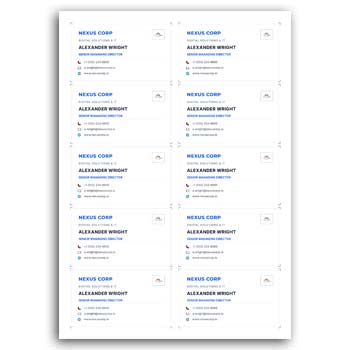
A Visiting Card Design Editable PDF Free Download can make the design process faster by providing a prepared layout that can be customized. Instead of creating the complete card from a blank document, you can modify the available design and prepare a professional card according to your requirements.
Why an Editable Visiting Card Is Useful
An editable design gives you more control over the final appearance of your business card. You can replace placeholder information with your own details and, depending on the format, adjust colors, fonts, graphics, and other elements.
This can be particularly useful for businesses that need to prepare cards for several employees or professionals who want to maintain a consistent personal brand.
Information Commonly Included
A professional visiting card may contain:
- ✓ Full name
- ✓ Job title or designation
- ✓ Company name
- ✓ Company logo
- ✓ Phone number
- ✓ Email address
- ✓ Website
- ✓ Office address
- ✓ Social media information
- ✓ QR code, when appropriate
Only include information that is useful to the person receiving the card. Too much information can make a small card difficult to read.
Editable PDF at a Glance
| Feature | Purpose |
|---|---|
| Editable text | Update personal and business information |
| Logo area | Add company branding |
| Color elements | Match the brand identity |
| Contact section | Display communication details |
| Front design | Present the primary identity |
| Back design | Add services or additional information |
| Printable layout | Prepare the card for physical printing |
| Reusable format | Create multiple versions efficiently |
Advantages and Disadvantages
| Advantages | Disadvantages |
|---|---|
| ✓ Saves initial design time | • Editing options depend on the PDF |
| ✓ Easy to personalize | • Some PDF elements may be locked |
| ✓ Can be reused | • Specialized software may be needed |
| ✓ Supports consistent branding | • Complex graphics can be difficult to modify |
| ✓ Suitable for multiple professionals | • Incorrect editing can affect alignment |
| ✓ Convenient for quick preparation | • Print quality depends on the final setup |
Customize the Basic Design
After opening the editable file, replace the sample name, company details, phone number, email, and other information. If a logo placeholder is available, replace it with your own brand logo.
Do not simply fill in the text and stop there. Review the complete composition to ensure the new information fits naturally within the available space.
Keep Typography Readable
Visiting cards are relatively small, so typography needs careful attention. Use fonts that remain readable when the card is printed at its actual size.
The person’s name or company name can receive greater visual emphasis, while contact details should remain clear without becoming visually dominant.
Match Your Brand
A visiting card should ideally look like part of the same visual identity as your other business materials. Use colors and typography that relate to your website, logo, letterhead, and other stationery.
This consistency can make the company easier to recognize when customers encounter different types of documents or promotional materials.
Front and Back Design
A two-sided visiting card provides additional space for useful information. The front can focus on the person’s identity and contact information, while the reverse side can contain services, a slogan, QR code, or other relevant details.
However, the back should not become overcrowded. Keep the information focused and make sure both sides work together visually.
Related Business Resources
A professional stationery collection often includes more than a visiting card. You can also explore an Invoice Template Maker Online Free Download for creating business billing documents.
For users looking for an editable invoice solution, Wave Invoice Maker Editable Download is another related resource.
A branded stationery collection can also include a Design Template Letter Head Format Editable for official business correspondence.
Who Can Use an Editable Visiting Card?
This type of template can be useful for:
- Business owners
- Entrepreneurs
- Freelancers
- Corporate employees
- Sales representatives
- Consultants
- Designers
- Marketing professionals
- Service providers
- Small business teams
If several employees work for the same company, a common design can be customized with individual names and positions while keeping the company branding unchanged.
Preparing for Print
Before sending the design to a printing service, check the document dimensions, margins, image quality, and text alignment. Make sure no important information is positioned too close to the edges.
A test print can be helpful for checking how the colors and typography appear in physical form. What looks balanced on a monitor may appear slightly different when printed.
Use a High-Quality Logo
The logo is often one of the first things people notice on a business card. Use a high-resolution version whenever possible.
Avoid stretching the logo disproportionately. Maintaining the original aspect ratio will help preserve a clean and professional appearance.
Keep Contact Information Accurate
A beautiful card is not useful if the contact information is incorrect. Carefully check every phone number, email address, website URL, office address, and social media handle.
It is worth performing a final proofreading check before producing multiple copies. Correcting an error after printing can be more expensive than correcting it in the design file.
Add a QR Code Carefully
A QR code can provide a convenient connection to a website, portfolio, digital profile, contact page, or other online destination. If you include one, make sure it is large enough to scan reliably.
Test the QR code using several devices before printing. Also leave enough clear space around it so that the code can be recognized properly.
Digital and Physical Use
Although visiting cards are traditionally printed, digital versions can also be shared through email, messaging platforms, websites, and social media.
A properly exported PDF or image can therefore serve as a digital contact card while the printed version remains useful during face-to-face meetings.
Avoid Excessive Decoration
Creative elements can make a visiting card memorable, but excessive graphics may reduce readability. The most important information should remain immediately visible.
Try to maintain a clear hierarchy between the name, company, designation, and contact information. A simple and well-balanced design can often appear more professional than an overcrowded one.
Create Multiple Versions
An editable template can be particularly useful when a company needs cards for multiple employees. The core branding can remain unchanged while names, positions, phone numbers, and email addresses are updated.
Keep one approved master file and create separate copies for individual employees. This reduces the possibility of accidentally changing the standard company design.
Digital Design References
A visiting card is part of a broader category of professional stationery and personal branding materials. Understanding how business cards are commonly used can help when deciding what information belongs on your own design.
For a general reference, visit Business Card on Wikipedia.
For additional creative inspiration, explore Business Card Design Templates.
Before Downloading or Editing
Check the available file format and determine whether it supports the type of customization you need. Some PDF templates may allow text changes but provide limited control over graphics, while other formats can offer broader editing options.
Also check whether the design is suitable for your intended printing dimensions. Preparing the correct size from the beginning can prevent unnecessary adjustments later.
A Practical Design Workflow
Choose a suitable editable template and replace all placeholder information. Add your logo, adjust the colors if necessary, and review the typography and spacing.
Then create a test version and inspect it at actual size. Once everything looks correct, save the master file and export the final version for printing or digital sharing.
Final Thoughts
A Visiting Card Design Editable PDF Free Download can provide a convenient starting point for creating professional contact cards. It allows you to personalize essential information while reducing the amount of work required to build the layout from scratch.
Whether you are creating a card for yourself, a small business, or an entire team, focus on accurate information, readable typography, consistent branding, and balanced spacing. A well-prepared visiting card can make a strong professional impression while keeping your contact information easy to access.
Leave a Reply