









Loading tools... Please wait.
PDF Invoice Editor Online Free
Editing an invoice does not always require advanced accounting software. A PDF Invoice Editor Online Free can be useful when an existing invoice needs quick changes, corrections, or additional information before it is shared with a customer.
Online PDF editing tools can provide a convenient browser-based workflow for making changes to text, adding information, inserting images, or adjusting certain document elements. The exact editing capabilities depend on the tool and the structure of the PDF file.
What Is a PDF Invoice Editor?
A PDF invoice editor is a tool designed to modify an existing PDF document. Instead of recreating an invoice from the beginning, users may be able to update selected information within an existing document.
This can be useful when correcting customer details, changing prices, updating dates, or making other necessary adjustments.
Common Invoice Information
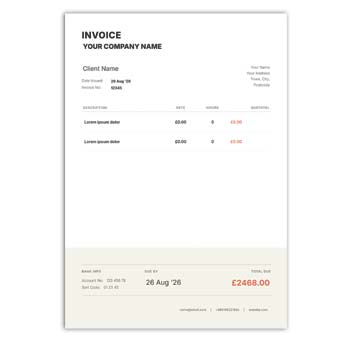
A typical invoice may contain:
- Business name
- Company logo
- Customer information
- Invoice number
- Invoice date
- Product or service description
- Quantity
- Unit price
- Subtotal
- Tax
- Discount
- Total amount
- Payment details
- Terms and notes
When an Online PDF Editor Is Useful
An online editor can be convenient when an invoice has already been created but requires a small correction. It can reduce the need to recreate the complete document.
For example, a business may need to update a customer’s address or correct a product description before sending the final invoice.
Advantages and Disadvantages
| Advantages | Disadvantages |
|---|---|
| ✓ Convenient for quick edits | • Editing depends on the PDF structure |
| ✓ No desktop installation may be required | • Some tools have feature limitations |
| ✓ Useful for minor corrections | • Complex PDFs may be difficult to edit |
| ✓ Can save document preparation time | • Internet access is generally required |
| ✓ Suitable for occasional use | • Privacy should be considered for financial documents |
| ✓ Can support digital workflows | • Advanced features may require payment |
Edit Only What Is Necessary
When modifying an invoice, change only the information that needs correction. Avoid unnecessarily altering the original layout because this can create inconsistencies between different invoices.
If the document contains financial information, review all affected calculations after making an edit.
Check the Invoice Number
The invoice number should remain consistent with your business record. If the invoice is being corrected rather than replaced, follow your established numbering and document-control process.
Avoid accidentally changing an invoice number simply because another field has been edited.
Verify Financial Information
After editing prices, quantities, discounts, or taxes, carefully check the final amount. A PDF editor may allow text changes without automatically recalculating financial values.
For this reason, manually verify the mathematical accuracy of the completed invoice.
Maintain Professional Branding
The invoice should normally match the visual identity of the business. Keep the logo, typography, colors, and spacing consistent with other company stationery.
For corporate documentation, a Corporate Office Writing Pad Design Editable Free Download can also be useful as part of a broader stationery collection.
Related Cash Memo Designs
Businesses that issue invoices may also use cash memos for direct sales. A Colourful Cash Memo Format Editable Download provides another type of sales documentation format.
For restaurants and food-service businesses, a Restaurant Cash Memo Editable Template Free may be more relevant to everyday customer transactions.
PDF Editing vs. Creating a New Invoice
If an existing invoice only requires a few corrections, editing the PDF may save time. However, if many elements need to be changed, creating a fresh invoice from an editable template may provide better control.
Choose the approach based on the extent of the required modifications.
Keep the Text Readable
During editing, make sure replacement text uses an appropriate size and remains aligned with the surrounding content. Inconsistent fonts or spacing can make an invoice look unprofessional.
Pay particular attention to customer information and financial figures.
Adding a Logo
Some PDF editors allow users to insert images. If a logo needs to be added, use a high-quality image and maintain its original proportions.
The logo should support the business identity without taking attention away from the invoice details.
Digital Invoice Workflow
Once the editing is complete, save the final document as a new version. Keeping the original PDF unchanged can be helpful if you need to compare the edited version later.
Before sending the file, open the final PDF and check every important field.
Printing the Edited Invoice
If the invoice will be printed, review the page size, margins, alignment, and image quality. An edit that looks correct on screen may reveal spacing problems when printed.
A test print can be useful before producing multiple copies.
Protect Customer Information
Invoices may contain names, addresses, contact information, transaction details, and other business data. When using an online PDF editor, consider the privacy and security practices of the service.
Avoid uploading confidential documents to unfamiliar platforms unless you are comfortable with their data-handling policies.
Keep Backup Copies
Save the original invoice and the corrected version separately when appropriate. Use clear filenames that include useful references such as the invoice number or date.
Organized records make it easier to locate previous invoices when needed.
Useful for Different Businesses
PDF invoice editing can be useful for:
- Freelancers
- Small businesses
- Retailers
- Consultants
- Agencies
- Contractors
- Online sellers
- Service providers
- Startups
- Professional offices
The importance of PDF editing will depend on how frequently invoices are created and how complex the billing process is.
Don’t Rely on Editing for Accounting
A PDF editor is primarily a document-editing tool. It does not necessarily provide accounting functions such as inventory management, tax reporting, expense tracking, customer databases, or financial analysis.
Businesses with complex financial operations may need dedicated invoicing or accounting software.
Invoice Reference
An invoice is a commercial document used to record goods or services supplied and the amount payable. Understanding its basic purpose can help when deciding which information should be retained during editing.
For a general reference, visit Invoice on Wikipedia.
Design Considerations
Invoice design should prioritize clarity, structure, and readability. A well-organized layout helps customers quickly identify the seller, transaction details, and final amount.
For additional invoice design inspiration, explore Invoice Templates on Canva.
Before Saving the Final PDF
Review the following:
- Business information
- Customer details
- Invoice number
- Date
- Product or service details
- Quantity
- Unit price
- Discount
- Tax
- Total amount
- Payment information
- Logo and branding
- Page layout
This final inspection can help identify errors introduced during editing.
Create a Clear Versioning System
If an invoice needs multiple corrections, use a simple file-naming system rather than overwriting every previous copy. This can help distinguish the original document from corrected versions.
For example, the invoice number and revision date can be included in the filename.
When to Use an Editable Template
If you regularly create new invoices, an editable invoice template may be more practical than repeatedly modifying completed PDFs. A master template can contain your standard business information and design.
Each new invoice can then be created from the master while customer-specific information is updated.
Final Thoughts
A PDF Invoice Editor Online Free can be a practical solution for making quick changes to an existing invoice without rebuilding the entire document. It is particularly useful for correcting details, updating information, and preparing a final version for digital sharing or printing.
Always verify financial calculations after editing and consider the privacy of any business or customer information uploaded to an online service. For recurring invoicing, maintaining a professional editable master template can provide a more efficient long-term workflow.
Leave a Reply