









Loading tools... Please wait.
Online Invoice Generator Free
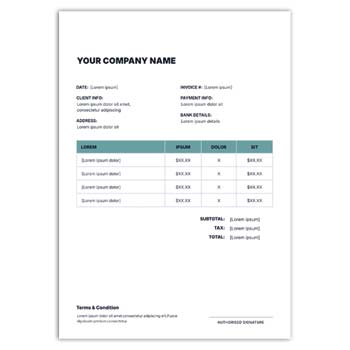
Creating a professional invoice can be quick and convenient with an Online Invoice Generator Free. Instead of designing an invoice manually, users can enter business information, customer details, products or services, prices, and payment information into a ready-made format.
Online invoice generators can be useful for freelancers, small businesses, retailers, consultants, agencies, and service providers that need a simple way to prepare billing documents.
What Is an Online Invoice Generator?
An online invoice generator is a web-based tool that helps users create structured invoices without requiring advanced design or accounting skills. Most tools provide predefined sections for entering the essential information.
Depending on the platform, the finished invoice may be downloaded, printed, or shared digitally.
Common Invoice Elements
A professional invoice may include:
- Business name
- Logo
- Business address
- Customer details
- Invoice number
- Invoice date
- Product or service description
- Quantity
- Unit price
- Discount
- Tax
- Total amount
- Payment information
- Notes or terms
The required fields can vary depending on the type of business.
Why Use an Online Invoice Generator?
A ready-made invoice generator can save time and reduce the effort involved in formatting a document from scratch. It provides a structured layout so that users can concentrate on entering accurate transaction information.
It can be especially useful for businesses that do not need a complete accounting system.
Advantages and Limitations
| Advantages | Limitations |
|---|---|
| ✓ Quick invoice creation | • Free features may be limited |
| ✓ Easy to use | • Customization varies |
| ✓ Reduces manual formatting | • Internet access may be required |
| ✓ Suitable for small businesses | • Advanced accounting features may be unavailable |
| ✓ Useful for digital sharing | • Privacy should be considered |
| ✓ Provides reusable formats | • Download options may differ |
Add Business Information
Enter your company or professional information first. This may include the business name, logo, address, phone number, email address, and website.
Check all information carefully before using the invoice because incorrect contact details can affect future documents.
Enter Customer Information
Add the customer’s relevant information in the appropriate section. Depending on the transaction, this may include the customer’s name, company, address, phone number, or email address.
Keep seller and customer information clearly separated.
Add Products or Services
Describe each product or service clearly in the item section. Include the quantity and unit price so that the customer can understand how the total amount was calculated.
Use concise descriptions and consistent formatting throughout the invoice.
Verify the Total
Before sending an invoice, check the subtotal, discounts, taxes, and final amount. Even when an online generator performs calculations automatically, incorrect input can still produce an incorrect result.
Always review the financial figures before issuing the document.
Related Invoice Generator
For another simple option, explore the Simple Free Online Invoice Generator.
Different invoice generators may provide different layouts and customization features, so select a format that suits your business requirements.
Letterhead and Brand Identity
Invoices can be part of a company’s broader stationery system. A consistent visual identity can be maintained across invoices and official communication using a Fashion Letter Head Design Editable Free Download.
For another stationery design resource, explore the Letterhead Background Design Free Download.
Professional Invoice Design
An invoice should be easy to understand at a glance. Use clear headings, readable typography, adequate spacing, and a well-organized item table.
A logo and brand colors can be included to strengthen business identity without making the document unnecessarily decorative.
Invoice Numbering
Assign each invoice a unique number according to your business’s record-keeping system. A consistent numbering method can make it easier to identify individual transactions.
Keep a record of issued invoices for future reference.
Payment Details
Include clear payment instructions when necessary. Depending on your business, this may include bank details, mobile payment information, accepted payment methods, or payment deadlines.
Make sure the information is accurate and easy for the customer to locate.
Digital Invoice Workflow
After completing the invoice, save a copy for your records. If the generator provides PDF output, it can be useful for maintaining the document’s layout when sharing it digitally.
Open the final document before sending it to make sure all information is displayed correctly.
Printing Considerations
For printed invoices, check the paper size, margins, logo quality, and alignment. A test print can help identify problems before producing multiple copies.
Ensure that important information remains inside the printable area.
Keep Organized Records
Store invoices using a consistent file-naming and folder system. This makes it easier to locate previous transactions when needed.
If an invoice is corrected, consider keeping the original and revised versions separately where appropriate.
Suitable for Different Businesses
An online invoice generator can be useful for:
- Freelancers
- Retailers
- Small businesses
- Consultants
- Contractors
- Agencies
- Online sellers
- Service providers
- Startups
- Independent professionals
The ideal solution depends on the volume and complexity of the business’s invoicing requirements.
Invoice Generator vs. Accounting Software
An invoice generator primarily helps create billing documents. Accounting software may provide additional functions such as expense tracking, inventory management, payment tracking, tax management, and financial reporting.
For simple billing needs, an online generator may be sufficient. Larger or more complex businesses may require dedicated accounting software.
Protect Customer Information
Invoices may contain customer and transaction information. Before using an online service, review its privacy and data-handling policies.
Avoid uploading confidential documents to unfamiliar services without understanding how the information may be handled.
Customize Your Invoice
If customization is available, add your logo and use appropriate brand colors and typography. Consistent visual elements can make invoices look more professional.
However, keep the layout simple enough that customers can quickly identify the transaction details and amount payable.
What Is an Invoice?
An invoice is a commercial document that records goods or services supplied and the amount payable by a customer.
For a general reference, visit Invoice on Wikipedia.
Explore Invoice Design Resources
Effective invoice design focuses on readability, hierarchy, spacing, alignment, and branding. A clean layout can make important financial information easier to understand.
For additional design inspiration, explore Invoice Templates on Canva.
Final Checklist
Before sending an invoice, verify:
- Business information
- Customer details
- Invoice number
- Invoice date
- Product or service details
- Quantity
- Unit price
- Discount
- Tax
- Total amount
- Payment details
- Logo
- Contact information
A final review can help prevent common billing and formatting errors.
Final Thoughts
An Online Invoice Generator Free can be a practical solution for creating professional invoices without complicated software or extensive design work. It is particularly useful for freelancers, small businesses, retailers, and service providers with straightforward billing requirements.
For regular use, choose a format that is easy to customize, matches your brand identity, and supports clear and accurate transaction records.
Leave a Reply