









Loading tools... Please wait.
Letterhead Word Template Free Download PDF
A professional letterhead can give business correspondence a clear and recognizable identity. Instead of designing every page from the beginning, an editable Word template can provide a ready-made structure for adding company information and preparing official documents.
A Letterhead Word Template Free Download PDF can be useful for businesses, offices, freelancers, organizations, and professionals who need a consistent document format. Depending on the template, users may customize the company name, logo, contact information, colors, and other design elements.
What Is a Letterhead Template?
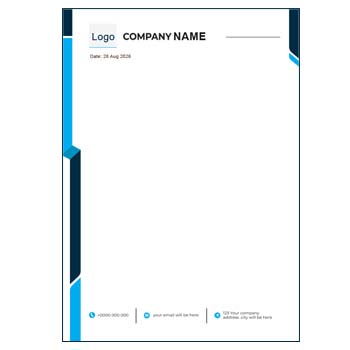
A letterhead template is a pre-designed page layout that usually contains branding and contact information in the header and footer areas. The central portion is kept available for writing letters, notices, proposals, or other official content.
Word-compatible templates can be particularly convenient for users who are already familiar with Microsoft Word or similar document-editing software.
Common Letterhead Elements
A professional letterhead may include:
- Company name
- Business logo
- Office address
- Phone number
- Email address
- Website
- Social media information
- Header graphics
- Footer details
- Registration or contact information
The exact elements should depend on the organization’s communication requirements.
Word Template and PDF
Word and PDF serve different purposes. An editable Word document is generally more convenient when the content or design needs to be changed, while PDF is commonly preferred when the final document needs to preserve its layout during sharing or printing.
For regular business use, keeping an editable master copy and exporting final documents as PDF can be a practical workflow.
Quick Feature Comparison
| Feature | Word Template | PDF Version |
|---|---|---|
| Text editing | ✓ Usually convenient | • May require PDF editing software |
| Design customization | ✓ Often flexible | • Depends on file structure |
| Reusable master | ✓ Excellent | ✓ Possible |
| Digital sharing | ✓ Possible | ✓ Common |
| Printing | ✓ Supported | ✓ Supported |
| Layout preservation | • Can vary by software | ✓ Generally strong |
Advantages and Limitations
| Advantages | Limitations |
|---|---|
| ✓ Saves design time | • Template compatibility can vary |
| ✓ Easy to reuse | • Some elements may be difficult to edit |
| ✓ Suitable for office communication | • Word versions may display differently across software |
| ✓ Supports business branding | • PDF editing may require additional tools |
| ✓ Can be adapted for different documents | • Printing specifications still need checking |
| ✓ Useful for digital and printed documents | • Free templates may offer limited customization |
Customize Your Company Identity
Start by replacing the sample company name and logo with your own branding. Update the address, telephone number, email, website, and any other relevant information.
Make sure the logo remains clear and properly proportioned. Avoid stretching images because it can reduce the professional appearance of the document.
Keep the Layout Balanced
The header should provide enough branding to identify the organization without taking up too much space. The main writing area should remain large enough for normal business correspondence.
A simple layout is often more practical than one filled with decorative graphics.
Choose Appropriate Fonts
Typography has a major influence on the overall appearance of a letterhead. Use fonts that are easy to read in both printed and digital formats.
Maintaining a limited number of font styles can help the document look more consistent and professional.
Use Brand Colors Carefully
If the company already has established brand colors, use them consistently in the letterhead. This can help connect the document with the organization’s website, business cards, invoices, and other stationery.
For everyday office printing, also consider whether the amount of color is practical and economical.
Related Company Stationery
A letterhead is usually one part of a larger business stationery system. For employee identification, you can explore the Company ID Card Template Editable Free Download.
For customer scheduling and professional communication, an Online Appointment Card Template Editable can also be useful.
These documents can share similar branding elements to create a more unified corporate identity.
Office Quotation Documents
Businesses often use letterheads alongside quotations and other administrative documents. If you need a related stationery format, explore the Office Stationery Quotation Format.
Using consistent company information across these documents can make everyday office documentation more organized.
Where Can You Use a Letterhead?
An editable letterhead can be used for:
- Official company letters
- Business proposals
- Quotations
- Notices
- Reports
- Client communication
- Office announcements
- Confirmation letters
- Administrative documents
- Professional correspondence
A single master template can be adapted for different purposes without changing the core company branding.
Digital Letterhead Workflow
For digital communication, create the document using the editable template and export the completed version as PDF when the layout is finalized.
Before sending it, open the PDF and check the logo, contact details, page margins, fonts, and overall alignment.
Printing Considerations
If the letterhead will be printed, select an appropriate paper size and ensure that all important elements remain within the printable area.
A test print is recommended before ordering or printing a large quantity. Check the header, footer, colors, logo quality, and margins.
Maintain a Master Copy
After customizing the template, keep an untouched master version. Create a separate copy whenever preparing a new letter or document.
This prevents accidental changes to the standard company stationery and helps maintain consistency across documents.
Letterhead for Different Organizations
Editable letterhead templates can be adapted for:
- Corporate offices
- Small businesses
- Startups
- Freelancers
- Agencies
- Educational institutions
- NGOs
- Consultants
- Professional services
- Creative businesses
The visual style can be adjusted according to the organization’s industry and target audience.
Keep Important Information Accurate
Before using the template officially, check every piece of contact information. Verify the company name, address, telephone number, email address, website, and registration information if included.
Incorrect contact information can be repeated across every document created from the template.
Avoid Excessive Decoration
A letterhead should support the content rather than compete with it. Large graphics, complex backgrounds, or excessive colors can reduce the available writing space and affect readability.
A clean header, clear typography, and balanced spacing are usually enough for an effective business letterhead.
What Is Letterhead?
Letterhead is stationery that commonly contains an organization’s identifying information and is used for written communication.
For a general reference, visit Letterhead on Wikipedia.
Explore Letterhead Design Ideas
When creating a letterhead, consider the relationship between the logo, typography, colors, margins, and writing area. The design should remain functional for both short letters and longer documents.
For additional design inspiration, explore Letterhead Templates on Canva.
Word Template Best Practices
When editing a Word letterhead, avoid moving core design elements unnecessarily. If the template uses headers and footers, keep those elements in their designated areas whenever possible.
Also check how the document appears when opened on another computer or exported to PDF.
Before Final Use
Review the following:
- Company name
- Logo
- Address
- Phone number
- Website
- Font consistency
- Header alignment
- Footer alignment
- Page margins
- Writing space
- Print appearance
A final review helps ensure that the template is ready for official use.
Final Thoughts
A Letterhead Word Template Free Download PDF can provide an efficient starting point for creating professional business stationery. An editable Word version allows customization, while PDF can be useful for distributing or printing the completed document.
Choose a layout that reflects your brand, keeps essential information easy to find, and leaves sufficient space for the actual content. A well-organized letterhead can make everyday business communication look more consistent and professional.
Leave a Reply