









Loading tools... Please wait.
Invoice Template Maker Online Free Download
Creating an invoice from scratch can take unnecessary time, especially when the same type of document is prepared repeatedly. An Invoice Template Maker Online Free Download can offer a convenient starting point for creating organized billing documents without manually designing every section.
With a suitable online template or maker, users can enter business information, customer details, products or services, prices, and payment information into a structured format. The final document can then be prepared for digital sharing or printing, depending on the available features.
What an Invoice Template Maker Provides
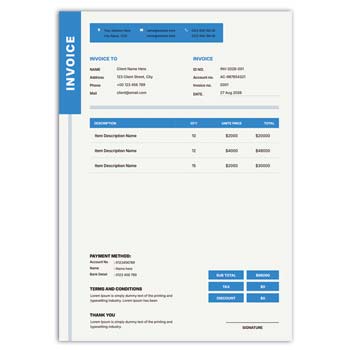
An invoice maker generally brings the most important billing fields together in one organized layout. This allows users to focus on transaction information rather than spending time arranging tables and headings.
A basic invoice may contain:
- Business name and logo
- Customer information
- Invoice number
- Invoice date
- Product or service details
- Quantity
- Unit price
- Subtotal
- Discount or tax
- Final amount
- Payment details
- Notes or terms
A Quick Look at the Structure
| Invoice Section | Main Purpose |
|---|---|
| Business details | Identifies the seller |
| Customer details | Identifies the buyer |
| Invoice number | Tracks the transaction |
| Date | Records when it was issued |
| Item table | Lists products or services |
| Price section | Shows individual costs |
| Total | Displays the amount payable |
| Payment details | Provides payment instructions |
| Notes | Adds additional information |
Why Use an Online Maker?
An online invoice maker can be useful when you need to prepare a document quickly through a web browser. It may eliminate the need to install dedicated design software for basic invoice creation.
This approach can be particularly convenient for freelancers, small businesses, consultants, and service providers who do not require a complete accounting platform.
Editable and Reusable
Once a suitable invoice format has been customized with your business details, it can serve as a reference for future invoices. The standard information can remain unchanged while customer and transaction details are updated.
Keeping a reusable structure can make recurring billing more efficient.
Advantages and Disadvantages
| Advantages | Disadvantages |
|---|---|
| ✓ Saves formatting time | • Free features may be limited |
| ✓ Easy to create basic invoices | • Internet access may be required |
| ✓ Provides a structured layout | • Customization varies between tools |
| ✓ Suitable for recurring transactions | • Advanced accounting features may be unavailable |
| ✓ Useful for small businesses | • Some formats may require additional editing |
| ✓ Can support digital sharing | • Data privacy should be considered |
Customize Your Business Information
Begin by adding your company or personal business information. This can include the business name, address, phone number, email address, website, and logo.
Check the information carefully before saving the template. Once the document becomes a standard business format, incorrect details could be repeated across multiple invoices.
Organize Customer Details
Customer information should be clearly separated from the seller’s information. Depending on the nature of the transaction, you may include the customer’s name, company, address, phone number, or email address.
Only include information that is necessary for the transaction and record-keeping process.
Make the Item Table Clear
The product or service section is usually the central part of an invoice. Use clear columns for descriptions, quantities, unit prices, and amounts.
If several products are included, maintain consistent alignment throughout the table. This makes it easier for customers to review the invoice.
Verify the Final Amount
Before sending an invoice, check the calculations carefully. Review the subtotal, discount, applicable tax, and final amount.
If the online tool calculates the values automatically, still inspect the completed invoice. Automated calculations cannot correct incorrect information entered by the user.
Related Cash Memo Templates
Businesses that use invoices may also need cash memos for direct sales transactions. A Colourful Cash Memo Format Editable Download can provide a different format for recording sales and payments.
For food-service businesses, a Restaurant Cash Memo Editable Template Free may be more appropriate for customer transactions.
Voucher Documentation
Financial documentation can also include payment and transaction vouchers. You can explore the Voucher Format Design Editable PDF Download for another related business document format.
Using appropriate formats for different types of transactions can make business records easier to organize.
Invoice Numbering
A unique invoice number is useful for tracking individual transactions. Businesses can establish a simple sequential numbering system or another internal method that suits their workflow.
Avoid duplicate numbers and keep a record of issued invoices. This can make future searches and financial reviews easier.
Add Payment Information
Customers may need clear instructions about how and when to make payment. Depending on the business, the invoice can include accepted payment methods, payment deadlines, or other relevant instructions.
Keep this section concise and easy to locate.
Keep the Design Professional
An invoice does not need excessive decoration to look professional. Clear typography, organized sections, sufficient whitespace, and a logical hierarchy are usually more important.
Brand colors and logos can be used to make the document recognizable without distracting from the financial information.
Use Consistent Branding
Try to maintain the same logo, typography, and visual language across invoices and other business stationery.
A consistent design between invoices, cash memos, vouchers, letterheads, and business cards can help establish a stronger overall business identity.
Digital Invoice Workflow
After completing the invoice, export or save the final version in an appropriate digital format. PDF is often useful when the layout needs to remain consistent while being shared electronically.
Open the completed file before sending it to the customer. Check the text, numbers, logo, page layout, and total amount.
Printing the Invoice
If physical invoices are required, confirm the paper size and printable margins. Important information should not be too close to the edges.
A test print can help identify problems with font size, alignment, or excessive background graphics before printing larger quantities.
Suitable for Different Users
An online invoice maker can be useful for:
- Freelancers
- Small businesses
- Retailers
- Consultants
- Agencies
- Contractors
- Online sellers
- Service providers
- Startups
- Independent professionals
The ideal format depends on the complexity and frequency of your billing activities.
Keep a Master Template
After customizing the standard business information, save a clean master copy if the platform allows it.
For every new transaction, use the master as the starting point and update only the relevant customer and billing information. This reduces repetitive work and helps maintain consistency.
Online Maker vs. Accounting Software
An invoice template maker is mainly designed to create invoices. Accounting software may offer broader capabilities, including customer management, inventory, expense tracking, tax calculations, payment tracking, and financial reporting.
For simple billing requirements, an invoice maker may be enough. Businesses with more complex financial operations may benefit from a dedicated accounting system.
What Is an Invoice?
An invoice is a commercial document that records goods or services supplied and the amount payable by a customer. It can provide an important reference for both the business and its customer.
For a detailed general reference, visit Invoice on Wikipedia.
Explore Invoice Design Ideas
Good invoice design combines practical information with a clean visual hierarchy. The business identity should be visible, but the customer should be able to find the transaction details and final amount immediately.
For additional design inspiration, explore Invoice Templates on Canva.
Before Downloading or Using a Template
Check the available file format, editing options, download restrictions, and printing requirements. A template that looks attractive may not be suitable if its important elements cannot be customized.
Also make sure the design provides enough space for the type and quantity of information you normally include on an invoice.
Final Review Checklist
Before sending the completed invoice, confirm:
- Business information
- Customer information
- Invoice number
- Date
- Product or service details
- Quantity
- Unit price
- Discount
- Tax
- Total amount
- Payment instructions
- Notes or terms
A short review can prevent common mistakes and unnecessary corrections.
Final Thoughts
An Invoice Template Maker Online Free Download can be a practical option for creating professional billing documents with less manual formatting. It provides a structured foundation that can be adapted to different businesses and transaction types.
For the best results, focus on accurate information, clear calculations, readable design, and consistent branding. A simple, reusable invoice format can make routine billing more organized while providing customers with a clear record of their transaction.
Leave a Reply