









Loading tools... Please wait.
Invoice Format Receipt Template
An invoice or receipt is an important part of everyday business documentation. It records transaction details, communicates the amount charged, and gives customers a clear reference for products or services purchased.
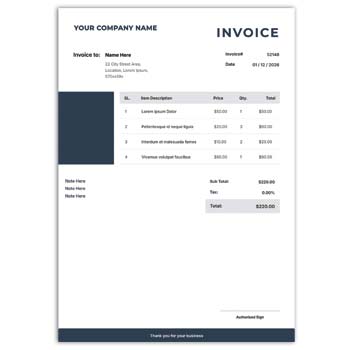
An Invoice Format Receipt Template provides a structured layout for preparing these documents without designing every section from the beginning. A suitable template can be customized with business information, customer details, transaction data, payment information, and branding elements.
Invoice and Receipt in Business
Although invoices and receipts are related, they are not always used for exactly the same purpose. An invoice generally communicates an amount that a customer is expected to pay, while a receipt is commonly used as evidence that a payment has been received.
The exact documentation process can vary depending on the type of business and applicable accounting requirements.
What a Good Template Can Contain
A practical invoice or receipt format may include:
- Business name and logo
- Business address
- Customer information
- Invoice or receipt number
- Date of issue
- Product or service description
- Quantity
- Unit price
- Subtotal
- Discount or tax
- Total amount
- Payment status
- Payment method
- Additional notes
Quick Structure
| Section | Purpose |
|---|---|
| Business details | Identifies the seller |
| Customer details | Identifies the buyer |
| Document number | Helps track transactions |
| Date | Records when the document was issued |
| Item details | Describes products or services |
| Amount | Shows individual and total costs |
| Payment details | Records payment information |
| Notes | Provides additional instructions |
Why Use a Template?
Starting with a ready-made format can save time and provide a consistent structure for recurring transactions. Businesses that prepare invoices regularly can customize one design and reuse it.
This also helps reduce differences between documents created by different employees or departments.
Benefits and Possible Drawbacks
| Benefits | Possible Drawbacks |
|---|---|
| ✓ Saves formatting time | • Some templates have limited editing |
| ✓ Creates a consistent document structure | • Certain designs may not suit every business |
| ✓ Easy to reuse | • Advanced features may require specialized software |
| ✓ Helps organize transaction information | • Manual data entry can still cause errors |
| ✓ Can support professional branding | • Printing costs may apply for physical copies |
| ✓ Suitable for routine business use | • Template fields may need customization |
Customize the Business Information
Begin by replacing placeholder information with your actual business details. Add the company name, logo, address, telephone number, email address, and website where appropriate.
Double-check these details before saving the final version. Incorrect contact information can cause problems when customers need to communicate with the business.
Make Transaction Details Clear
The item section should provide enough information for the customer to understand what was purchased. Product names, service descriptions, quantities, and prices should be easy to distinguish.
If several items are included, use a properly aligned table. This makes the calculation and review process much easier.
Use Accurate Calculations
The subtotal, discounts, taxes, and final amount should be checked before the document is delivered. If the template does not calculate values automatically, verify the figures manually.
A consistent calculation process is particularly important when invoices are prepared in large quantities.
Add a Unique Number
A unique invoice or receipt number can make transaction records easier to organize. Businesses can use sequential numbering or another internal system that fits their record-keeping process.
Avoid using the same number for multiple transactions unless your accounting system specifically requires it.
Related Business Stationery
A professional invoice often works best when it follows the same visual identity as the company’s other documents. A suitable Fashion Letter Head Design Editable Free Download can help create branded correspondence for businesses in the fashion industry.
For a more visual stationery approach, you can also explore Letterhead Background Design Free Download.
Another useful resource is an Editable Letterhead Template Free Download, which can complement an invoice or receipt design.
Invoice Format Reference
For a general explanation of invoices, see Invoice on Wikipedia.
Understanding the basic purpose of an invoice can help when deciding which information should be included in a business template.
Keep Branding Consistent
A business can use the same logo, typography, and color palette across invoices, receipts, letterheads, visiting cards, and other stationery.
This creates a unified visual identity and makes documents easier for customers to associate with the same business.
Invoice for Different Businesses
An invoice template can be adapted for many types of organizations, including:
- Retail shops
- Service providers
- Freelancers
- Agencies
- Consultants
- Online sellers
- Small businesses
- Manufacturers
- Distributors
- Professional offices
The information required can differ depending on the products, services, payment methods, and business practices involved.
Receipt-Focused Information
When a document is intended primarily as a receipt, payment information becomes particularly important. The document can indicate the amount received, payment method, transaction date, and relevant reference number.
Only include fields that are genuinely useful for the business and customer. Keeping the document focused can improve readability.
Digital Invoice and Receipt
Digital documents are increasingly common in modern business communication. A properly formatted PDF can be shared through email, messaging platforms, or other digital channels.
Before sending a digital copy, open the final file and verify that all text, numbers, logos, and tables are displayed correctly.
Printed Documents
Businesses that provide physical invoices or receipts should consider paper size, margins, typography, and print quality. A design that looks good on a screen may require adjustments for physical printing.
Conducting a test print can help identify issues before producing multiple copies.
Protect Important Records
Completed invoices and receipts should be stored in an organized manner. Businesses can categorize them by date, customer, invoice number, or accounting period.
A consistent digital filing system makes it easier to retrieve documents when customers request copies or financial records need to be reviewed.
Don’t Overdesign the Format
An invoice is primarily a functional business document. Decorative elements can support branding, but they should not interfere with product details, calculations, or payment information.
Keep the most important financial information visually prominent. Customers should be able to find the total amount and transaction details quickly.
Check Before Sending
Before issuing an invoice or receipt, review:
- Business name
- Customer name
- Document number
- Date
- Product or service information
- Quantity
- Price
- Discount
- Tax
- Total amount
- Payment status
- Payment instructions
A final review can prevent avoidable errors and reduce the need to issue corrected documents.
Keep a Reusable Master Template
After customizing the design, save a clean master copy. Use duplicate copies when preparing individual invoices or receipts.
This protects the original layout and ensures that future documents continue to use the approved business format.
Design Considerations
A useful invoice or receipt should balance branding with clarity. Clear typography, organized tables, adequate whitespace, and a logical information hierarchy can make the document easier to understand.
For additional design inspiration, explore Invoice Templates on Canva.
When a Simple Template Is Enough
Small businesses and independent professionals may only need a straightforward document containing customer details, transaction information, total amount, and payment details.
A simple template can often be more practical than a highly decorative design, particularly when invoices are prepared frequently.
When More Advanced Tools Are Better
Businesses with large numbers of transactions may require features beyond a basic template, such as automatic calculations, customer databases, inventory tracking, recurring invoices, tax reporting, or payment integration.
In those situations, dedicated invoicing or accounting software may be more suitable than a static template.
Final Thoughts
An Invoice Format Receipt Template can simplify routine financial documentation by providing an organized structure for transaction and payment information. With the right customization, it can be adapted to the visual identity and operational needs of many different businesses.
Whether you need invoices, payment receipts, or both, focus on accuracy, readability, consistent numbering, and clear presentation. A practical template can save time while making everyday business documentation more organized and professional.
Leave a Reply