Facebook Tips Help & tricks # 01↓
How to setting to publishing status, photograph and sharing post.
There are some option:
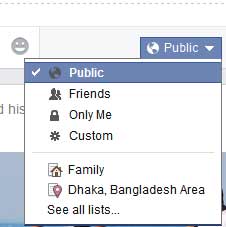
- Public (See your status or post everyone who is in facebook)
- Friends (See your status or post only friend who is in facebook)
- Only Me (Can’t see your status or post anyone only you can see)
- Custom (Here select option can custom select who see your status or post)
Facebook Tips Help & tricks # 02↓
Photo Tag option after Review than publishing your timeline.
If you want to review photo tagging option that tagged by your friend. Here flows some step:
- Chick your Account Settings
- Here see some option left side and select >Timeline and Tagging
- Here showing option “Timeline and Tagging Settings”
- 1st Who can add things to my timeline?

Review photograph or posts that friends tagged you or your timeline before they showing on your facebook timeline.
Facebook Tips Help & tricks # 03↓
Facebook Privacy Settings and Tools
How to easily setting and Privacy. Facebook privacy is very impotent for a Facebook account folder. Here some option:
Who can see my stuff?
- Who can see your future posts?
- Click edits option:
- Who can see your future posts?
You can manage the privacy of things you share by using the audience selector right where you post. This control remembers your selection so future posts will be shared with the same audience unless you change it.
- Public (See your status or post everyone who is in facebook)
- Friends (See your status or post only friend who is in facebook)
- Only Me (Can’t see your status or post anyone only you can see)
- Custom (Here select option can custom select who see your status or post)
Facebook Privacy Settings and Tools
Who can contact me?
• Who can send you friend requests?
- Public (See your status or post everyone who is in facebook)
- Friends (See your status or post only friend who is in facebook)
- Only Me (Can’t see your status or post anyone only you can see)
- Custom (Here select option can custom select who see your status or post)
Whose messages do I want filtered into my Inbox?
Who can look me up?
Chick “Edit” and select your option.
Who can look you up using the email address you provided?
Chick “Edit” and select your option.
Who can look you up using the phone number you provided?
Chick “Edit” and select your option.
Do you want other search engines to link to your timeline?
Chick “Edit” and select your option.
Do you want other search engines to link to your timeline?
Please note:When this setting is on, it is easier for other search engines to link to your timeline in search results.If you turn off this setting, it may take a while for search engines to stop showing the link to your timeline in their results. You select setting your Privacy.
More Help about Faacebook.com help
Login & Password
Get Started on Facebook
Manage Your Account
Privacy
Security
News Feed
Timeline
Sharing
Messaging
Connecting
Pages
Facebook Mobile
Popular Features
Facebook Ads
Report Something
Safety Tools & Resources
Apps, Games & Game Payments
Other Help Centers
Help Community
Learn About Graph Search
See What’s New on Facebook
Report an Issue
Build Your Facebook Page
Reach More People
Discover Basic Pages Tools
Top Questions
Why does my News Feed look different?
How do I change my password?
How do I reset my password?
When I post something, how do I choose who can see it?
How are Pages different from personal Timelines?