









Loading tools... Please wait.
Creating a professional invoice does not always require complicated accounting software. For freelancers, small businesses, service providers, and online sellers, an easy invoice maker can provide a convenient way to prepare clear billing documents.
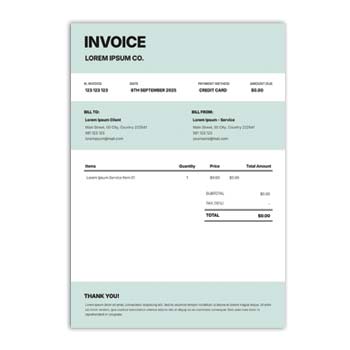
An Easy Invoice Maker Online Free Generator Online can help users create invoices by entering customer details, item descriptions, quantities, prices, taxes, and payment information. Online tools can be especially useful when an invoice needs to be prepared quickly from a computer or other connected device.
What Can an Invoice Maker Help With?
A typical invoice generator may provide a structured workspace for entering important billing information. Instead of manually arranging tables and calculations, users can work within a predefined invoice layout.
Depending on the particular tool, the finished invoice may be saved, printed, or exported into a suitable digital format.
Common Invoice Information
- Business or seller name
- Customer name and contact details
- Invoice number
- Invoice date
- Product or service description
- Quantity
- Unit price
- Subtotal
- Tax or discount
- Grand total
- Payment terms
- Additional notes
Quick Feature Overview
| Feature | Purpose |
|---|---|
| Customer details | Identifies the buyer |
| Invoice number | Helps track individual invoices |
| Item table | Lists products or services |
| Quantity and price | Records transaction values |
| Tax / discount | Adjusts the calculation |
| Total section | Shows the final amount |
| Notes | Adds payment or service information |
| Download / print | Creates a usable final document |
Why Online Invoice Generators Are Popular
An online generator can be useful when you need an invoice without installing a dedicated desktop application. Many tools provide a browser-based interface where basic information can be entered directly.
This can save time for users who only need straightforward invoices rather than a complete accounting system.
Advantages and Limitations
| Advantages | Limitations |
|---|---|
| ✓ Quick invoice preparation | • Features vary between tools |
| ✓ No complex design process | • Internet access may be required |
| ✓ Useful for small businesses | • Free versions may have restrictions |
| ✓ Reduces manual formatting | • Advanced accounting features may be unavailable |
| ✓ Easy to create repeat invoices | • Templates may offer limited customization |
| ✓ Convenient for occasional use | • Sensitive financial information requires care |
A Simple Invoice Creation Process
Start by entering the business or seller information. Next, add the customer’s details and assign a unique invoice number and date.
Enter the products or services with their respective quantities and prices. Review the subtotal, applicable tax or discount, and final amount before generating the invoice.
Keep Invoice Numbers Organized
A consistent numbering system can make invoices easier to locate later. For example, a business may use sequential numbers or a year-based numbering system.
Avoid creating duplicate invoice numbers for different transactions. Keeping a simple record of issued invoices can help with administration and bookkeeping.
Make the Invoice Easy to Read
An invoice should communicate financial information clearly. Use distinct headings and maintain sufficient spacing between customer details, item descriptions, and totals.
Avoid unnecessary decorative elements that make the document harder to scan. The customer should be able to identify the amount due and transaction details quickly.
Related Invoice Resource
If you need more control over an existing PDF invoice, you can explore this PDF Invoice Editor Online Free resource.
An editor can be useful when an existing invoice needs minor changes rather than requiring a completely new document.
Pair Invoices With Professional Stationery
Invoices can become more recognizable when they use the same visual identity as other business documents. A consistent logo, typography, and color scheme can connect invoices with company stationery.
For creative business documentation, you can also explore the Editable Creative Letterhead Design Creator Free.
Letterhead and Invoice Branding
A branded letterhead can help establish a consistent visual identity across official communication. If you also need a reusable document format, consider this Letterhead Word Template Free Download PDF.
Using related branding across invoices, letterheads, business cards, and other stationery can create a more unified presentation.
Useful for Different Users
An online invoice maker may be suitable for:
- Freelancers
- Small business owners
- Consultants
- Agencies
- Retailers
- Service providers
- Online sellers
- Independent professionals
- Startups
The ideal tool depends on the volume of invoices and the level of accounting functionality required.
Check the Calculations
Before sending an invoice, verify every quantity and price. Make sure the subtotal, discount, tax, and final amount are correct.
If the generator performs automatic calculations, it is still good practice to review the final result. A small numerical mistake can create confusion for both the seller and customer.
Include Payment Information
If customers need specific payment instructions, include them in a clearly visible section. This may include bank details, mobile payment information, payment deadlines, or other applicable instructions.
Only include payment information that is appropriate for your business and avoid exposing unnecessary sensitive details.
PDF for Digital Sharing
PDF is commonly used for invoices because it helps preserve the document’s layout when shared electronically. A properly generated PDF can be emailed or uploaded without requiring the recipient to recreate the design.
Open the final PDF before sending it and check the page layout, text, numbers, logo, and total amount.
Printing Considerations
Some businesses still provide printed invoices to customers. In that case, make sure the invoice fits the intended paper size and that all important fields remain within the printable area.
A test print can help identify issues with small fonts, margins, or excessive graphics.
Keep Digital Records
After creating an invoice, maintain a copy for your own records. Organize invoices by date, customer, invoice number, or accounting period.
A consistent filing system can make it easier to find previous transactions when customers ask for copies or when financial records need to be reviewed.
Free Does Not Always Mean Unlimited
An online invoice generator may advertise free access while restricting certain features. Download formats, branding removal, saved invoices, customization, or usage limits may vary.
Review the available features before relying on a particular service for regular business operations.
Online Invoice vs. Full Accounting Software
An invoice generator is generally focused on creating billing documents. Full accounting software may provide additional features such as expense tracking, tax management, inventory, customer records, and financial reporting.
For occasional or simple invoicing, a generator may be sufficient. Businesses with more complex financial requirements may need a broader accounting solution.
Invoice Design Basics
A good invoice combines practical information with clear visual hierarchy. The business identity should be noticeable, while item details and the final amount should remain easy to locate.
For general information about invoices, visit Invoice on Wikipedia.
Explore Design Inspiration
Invoice design can vary from simple minimalist layouts to more branded and visually distinctive formats. When choosing or customizing a template, prioritize readability and the way customers will actually use the document.
For additional design ideas and editable templates, explore Invoice Templates on Canva.
Before Generating the Final Invoice
Check the following items carefully:
- Seller information
- Customer information
- Invoice number
- Date
- Product or service details
- Quantity
- Price
- Tax or discount
- Final amount
- Payment instructions
- Terms and notes
Correcting these details before sending the invoice can prevent unnecessary follow-up with the customer.
A Practical Workflow
For regular invoicing, keep your standard business information ready. Enter the customer-specific details, add the transaction items, verify the calculations, and generate the final document.
Save the completed invoice using a consistent file name. This makes future retrieval easier and keeps your business records organized.
Final Thoughts
An Easy Invoice Maker Online Free Generator Online can be a practical solution for preparing straightforward invoices without spending significant time designing each document manually. It is particularly useful for freelancers, small businesses, and professionals who need a quick billing solution.
Choose a generator that provides the features you actually need, verify all financial information before sending the document, and maintain organized copies of completed invoices. A clean layout combined with accurate information can make everyday invoicing much easier and more professional.
Leave a Reply